Solutions
Your first hunt, live this afternoon.
Free to start · No download for participants
Use remote team building activities to create real participation, with instructions, timing, group-size guidance, low-prep options, and facilitator tips.
Remote teams don’t need louder Zooms or forced icebreakers. They need small, well-designed moments that create momentum, reveal personalities, and give people an excuse to participate for real. The good news: you can build those moments with short, repeatable activities that fit inside calendars already groaning with meetings.
A pattern we keep seeing: the activities that work are lightweight, time-boxed, and clearly hosted. They create a reason to speak, not just a room to sit in. They make “winning” feel possible in the first two minutes, then raise the ceiling for people who want more.
Below are 25 remote team building activities that teams keep asking to run again. They include setup notes, timing, group-size guidance, low‑prep versions, and facilitator tips drawn from running hundreds of virtual programs.
Most teams already feel the drag of too many meetings. Microsoft’s Work Trend Index has consistently flagged inefficient meetings and communication overload as primary productivity blockers, which is why every idea here is short, specific, and built to land quickly. Microsoft’s 2025 Work Trend Index
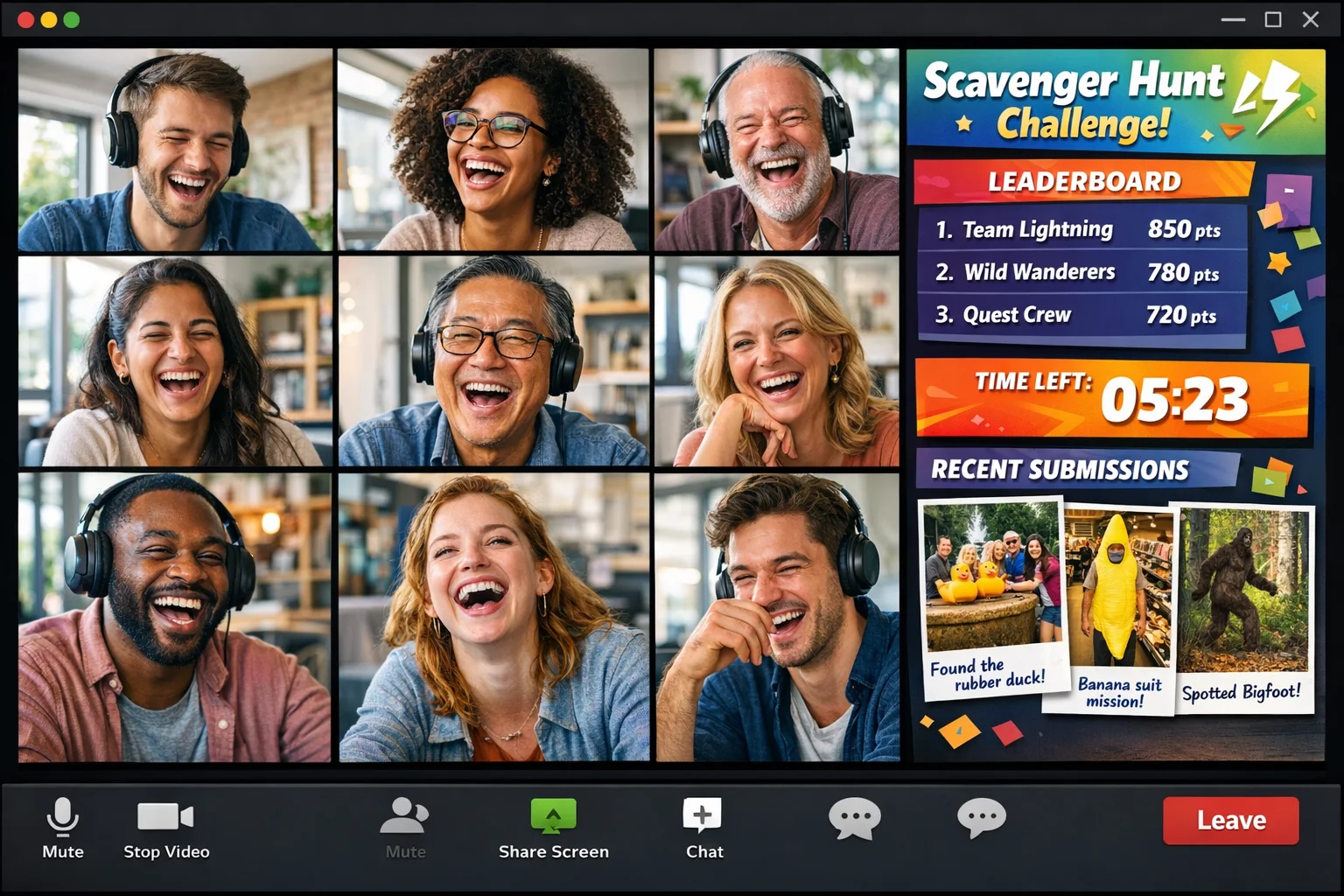
A fast, camera‑on hunt with photo, video, GPS check‑ins (for folks out on a walk), and quick trivia. It’s the easiest way to replace awkward silence with laughter in two minutes.
Time: 25–40 minutes.
Group size: Works in squads of 4–6; scale by adding rooms.
Prep: Light. Draft 10–15 challenges that mix easy wins with optional stretch tasks.
How to run: Kick off with a guaranteed layup, keep a live leaderboard visible, and end with a 3‑minute highlight reel.
Facilitator tip: End exactly on time while energy is still high.
If you want structure and live feedback, a purpose‑built scavenger hunt app keeps scoring, the feed, and the leaderboard tight without turning you into the scoreboard police.
Everyone grabs a meaningful object and shares a 30‑second story. Fast, human, zero prep.
Time: 10–20 minutes.
Group size: Up to 12 in one room; larger groups split.
Prep: None.
How to run: Use a timer and a visible speaking order.
Facilitator tip: Seed with a theme like “first job,” “favorite failure,” or “small daily joy.”
Short, mixed‑topic trivia rounds in breakout rooms. Celebrate wrong answers as loudly as right ones.
Time: 15–25 minutes.
Group size: Teams of 3–5.
Prep: 12–15 questions; include images or audio for variety.
How to run: Two rounds, then a quick final question for everyone.
Facilitator tip: Rotate captains to spread airtime.
Auto‑match pairs or trios for a 15‑minute chat this week. It quietly rebuilds weak ties.
Time: Asynchronous; 15 minutes per match.
Group size: Any; opt‑in works best.
Prep: Enable a pairing tool or lightweight spreadsheet.
How to run: Set a biweekly cadence with prompts.
Facilitator tip: Prompt ideas: “What hobby did you pick up and drop?” or “Best small purchase under $25.”
Audio‑only one‑on‑ones or small groups while walking. Reset energy, reduce screen fatigue.
Time: 20–30 minutes.
Group size: 2–3.
Prep: None.
How to run: Share a single focus question and mute notifications.
Facilitator tip: Offer an indoor alternative for poor weather.
One teammate teaches something useful or delightful in five minutes. The constraint keeps it fun.
Time: 10–20 minutes.
Group size: Up to 12.
Prep: Sign‑up sheet; limit slides to three.
How to run: Two rapid talks plus 2 minutes of Q&A each.
Facilitator tip: Rotate monthly to spread ownership.
Pick a theme and let people add one song. Start the meeting with a 30‑second clip.
Time: 10 minutes inside a normal meeting.
Group size: Any.
Prep: Shared playlist link.
How to run: Vote for an opener, play a snippet, move on.
Facilitator tip: Keep it PG and headphones‑safe.
End a recurring meeting by dropping a single meme or GIF that summarizes the vibe. Low effort, oddly bonding.
Time: 3 minutes.
Group size: Any.
Prep: None.
How to run: Create a standing Slack thread titled “Today in one meme.”
Facilitator tip: Retire stale memes monthly.
Most teams spend a lot of the week communicating already, so keeping rituals tiny matters. Microsoft’s research highlights that bloated, unfocused meetings are a major drag on energy and output, so use these only as lightweight bookends to real work. Microsoft’s 2025 Work Trend Index
A week‑long card of tiny prompts people can complete when it suits them.
Time: 5–10 minutes a day for 5 days.
Group size: Any.
Prep: Make a 5×5 card; include easy squares.
How to run: Track progress in a shared doc; small prize for a random finisher.
Facilitator tip: Keep squares inclusive of different roles and time zones.
Quick photo tour of a desk, view, or quirky tool. Personality with boundaries.
Time: 10–15 minutes.
Group size: Up to 12 per room.
Prep: None.
How to run: 60 seconds per person, max.
Facilitator tip: Make cameras optional and model consent for anything personal.
Recreate escape‑room mechanics with puzzles that require collaboration: ciphers, grids, image searches.
Time: 30–45 minutes.
Group size: Teams of 4–6.
Prep: Curate 4–6 puzzles of rising difficulty.
How to run: Share a starter clue; each solve reveals the next.
Facilitator tip: Seed hints at minute 10 and 20 to avoid stalls.
Classic two‑truths‑and‑a‑lie, upgraded with a related image for each “truth.”
Time: 15–25 minutes.
Group size: Up to 10.
Prep: Ask for images in advance.
How to run: Show all three, let teams debate, then reveal.
Facilitator tip: Encourage playful misdirection, never embarrassment.
A teammate leads a 20‑minute snack or mocktail lesson. Finish with on‑camera taste tests.
Time: 20–30 minutes.
Group size: Any.
Prep: Ingredient list 3–4 days prior; include swaps.
How to run: Keep it no‑cook or single‑pan for inclusivity.
Facilitator tip: Let people co‑host from different regions to showcase flavors.
Everyone completes a small good‑deed task during the week and posts a photo or note.
Time: 10 minutes per person.
Group size: Any.
Prep: Curate a list of options people can do from home.
How to run: Share out in a short recap meeting.
Facilitator tip: Keep it values‑aligned, not performative.
A rotating 3‑minute stretch, breath, or posture reset at the top of longer meetings.
Time: 3 minutes.
Group size: Any.
Prep: Create a bank of simple guided prompts.
How to run: Rotate who leads.
Facilitator tip: Anchor this in science, not fluff; the WHO recognizes burnout as an occupational phenomenon worth proactively addressing. World Health Organization: Burn‑out in ICD‑11
Momentum beats complexity. Start easy, then raise the ceiling.
People anonymously post a photo of a desk corner; teams guess whose is whose.
Time: 15–20 minutes.
Group size: Up to 20.
Prep: Collect photos ahead of time.
How to run: Reveal answers with a one‑liner story from each person.
Facilitator tip: Offer an alternative like “bag dump” or “what’s in my mug.”
Teams shoot a 15‑second video composed of exactly five shots. Creativity thrives on constraint.
Time: 25–35 minutes including screening.
Group size: Teams of 3–5.
Prep: Provide a simple theme and examples.
How to run: Host a rapid premiere with emojis as awards.
Facilitator tip: Cap editing to keep it scrappy and inclusive.
Trade two agenda items for a 10‑minute skill share someone already has: keyboard shortcuts, file‑naming sanity, or calendar judo.
Time: 10–15 minutes.
Group size: Any.
Prep: Sign‑ups and one slide.
How to run: One demo, one takeaway, one challenge for the week.
Facilitator tip: Capture “wins” next week to close the loop.
Silly, safe micro‑events: paper‑plane accuracy, fastest cable untangle, emoji charades.
Time: 20–30 minutes.
Group size: Any; compete in rooms.
Prep: Create clear scoring and safety notes.
How to run: Three events, one finale, tiny prizes.
Facilitator tip: Keep it inclusive of different mobility levels.
Pictionary‑style sketching in a shared board, with a strict 30‑second timer.
Time: 15–25 minutes.
Group size: Up to 12 per room.
Prep: Word lists by theme.
How to run: Rotate artists fast; celebrate the worst drawings.
Facilitator tip: Give non‑drawers the “clue master” role.
Replace a status wall of text with one picture: “What does your day feel like?” Everyone posts to a shared thread.
Time: 5–10 minutes.
Group size: Any.
Prep: None.
How to run: One image and a single sentence per person.
Facilitator tip: This works asynchronously in spread‑out teams.
A short talk, documentary clip, or product demo with group chat reactions. Keep the content under 20 minutes and focus on the discussion.
Time: 30–40 minutes including discussion.
Group size: Any.
Prep: Pre‑select a clip and 3 discussion prompts.
How to run: Chat during viewing, then 10 minutes of reactions.
Facilitator tip: Closed captions on; time zones matter for anything after hours.
Use a shared canvas to create a collage or logo remix in five minutes. Reveal and laugh.
Time: 10–15 minutes.
Group size: Any.
Prep: Drop assets in advance.
How to run: Set two rules and one wildcard constraint.
Facilitator tip: Celebrate chaos, not polish.
Turn a new hire’s first month into a simple quest with small social and systems challenges.
Time: Four 15‑minute touchpoints in month one.
Group size: 1 new hire + 1 buddy.
Prep: List 8–10 tasks: meet X, ship Y, learn Z.
How to run: Track progress in a lightweight board.
Facilitator tip: Make at least two tasks social by design.
Once a quarter, run a 30‑minute “ritual reset” to prune what’s stale and recommit to what works. Pair it with a tiny pulse on clarity, connection, and energy.
Time: 30 minutes.
Group size: Team‑level.
Prep: Use a simple health monitor framework.
How to run: Identify one ritual to stop, start, and continue; assign owners.
Facilitator tip: Keep score over time; Atlassian’s Team Playbook has practical plays and health monitors you can adapt immediately. Atlassian Team Playbook: Health Monitor
Remote teams don’t need spectacle; they need structure, clarity, and small hits of shared momentum. Pick two activities that feel natural, lock them into a recurring rhythm, and protect the time box. Then watch participation stop feeling like a favor and start looking like a habit.