Blog » Crowd Pleasing Wedding Scavenger Hunt Ideas Guests Will Love

Crowd-Pleasing Wedding Scavenger Hunt Ideas Guests Will Love

Updated: June 11, 2026

A wedding scavenger hunt turns passive guests into playful co‑hosts. Done well, it nudges people to mingle, notice great moments, and generate candid photos you’ll actually rewatch. It’s simple to set up, naturally social, and works for every age group.

At a Glance

  • Pick a format that matches your space and crowd size, not the trend.
  • Write prompts guests can complete without leaving their table for long.
  • Use clear timing and one visible place to submit or upload photos.
  • Keep it inclusive: mobility, language, and sensory needs considered.
  • Close the loop with a quick slideshow or prize moment so it feels complete.

What a wedding scavenger hunt is and why it works

A wedding scavenger hunt is a lightweight game where guests complete bite-sized prompts, often photo-based, during the reception. The best versions create micro-reasons to talk, look up, and move just enough to feel energized.

In our experience, the magic lives in three needs: autonomy, competence, and relatedness. Give guests choice, make success obvious, and build small wins with other people and you’ll see participation rise. That pattern maps to well-known motivation research on self-determination theory, which highlights autonomy, competence, and relatedness as core drivers. For a quick primer, see the APA’s summary of self‑determination theory. (dictionary.apa.org)

Pick a format that fits your wedding

There isn’t one “right” way. Match format to venue, timeline, and how much movement you want.

  • Photo “I Spy” cards at each table. Guests snap specific moments and upload or hand in a card. This is the classic reception-friendly version and shows up often in real weddings on sites like The Knot’s “I Spy” reception examples. (theknot.com)
  • Team table hunt. Each table works together. Great for full-room energy without clogging walkways.
  • Roaming mingle hunt. Solo or pairs collect interactions with people they don’t know yet. Use sparingly with large age ranges.
  • Kids’ corner hunt. A picture-led list at the kids’ table keeps younger guests moving with purpose.
  • Venue-wide adventure. For estates, gardens, or museums, create safe routes and staff checkpoints.

Build a list guests will actually do

We see four rules for write-ups that work:

  • Keep prompts concrete. “A laugh bigger than the cake” beats “have fun.”
  • Limit friction. No prompt should need a staff escort or a five-minute search.
  • Vary difficulty and points. Easy warm-ups, a few medium gets, one or two “long shots.”
  • Anchor to your story. Use your inside jokes, cultural elements, or venue quirks.

Wedding scavenger hunt ideas by moment

Use these as-is or as a springboard. Mix photo, video, GPS check‑ins, and simple Q&A. Point values are relative; scale up or down.

Cocktail hour (low-stakes mingle)

  • [Photo | 20 pts]: Two guests who just met laughing
  • [Photo | 20 pts]: A detail most people will miss (show us)
  • [Video | 40 pts]: Short toast to the couple in six words
  • [Q&A | 30 pts]: Guest who’s traveled the farthest (first name + city)
  • [Photo | 30 pts]: The couple’s names hidden somewhere

During dinner (keep movement tight)

  • [Photo | 20 pts]: Best-dressed shoes at your table
  • [Photo | 30 pts]: Creative selfie with table mates, no repeats
  • [Q&A | 30 pts]: Who at your table first met the couple?
  • [Photo | 40 pts]: A heart shape made from table items
  • [Video | 50 pts]: Table cheer under five seconds

Dance floor (energy and motion)

  • [Photo | 20 pts]: Airborne napkin or tie
  • [Video | 40 pts]: A three-person synchronized move
  • [Photo | 30 pts]: Shoes abandoned for dancing
  • [Photo | 40 pts]: A perfect spin or dip
  • [Video | 60 pts]: Surprise limbo with anything-but-a-stick

Kids’ mini-hunt (picture icons help)

  • [Photo | 10 pts]: Something sparkly
  • [Photo | 20 pts]: A heart bigger than your hand
  • [Photo | 20 pts]: Your silliest face with a grown‑up
  • [QR Code | 30 pts]: Find the hidden “congrats” sign
  • [Photo | 30 pts]: A flower you can point to, not pick

Outdoor or venue-forward prompts

  • [GPS Check‑in | 40 pts]: Secret garden gate marker
  • [Photo | 30 pts]: View that screams “this venue”
  • [Photo | 50 pts]: Reflection selfie in something that isn’t a mirror
  • [Q&A | 40 pts]: One fact about the venue staff shares
  • [Video | 60 pts]: Ten-second guided tour of your favorite corner

Running it smoothly: timing, roles, and flow

  • Timing window. Announce a clear start and end. Cocktail hour to first dance works for most rooms.
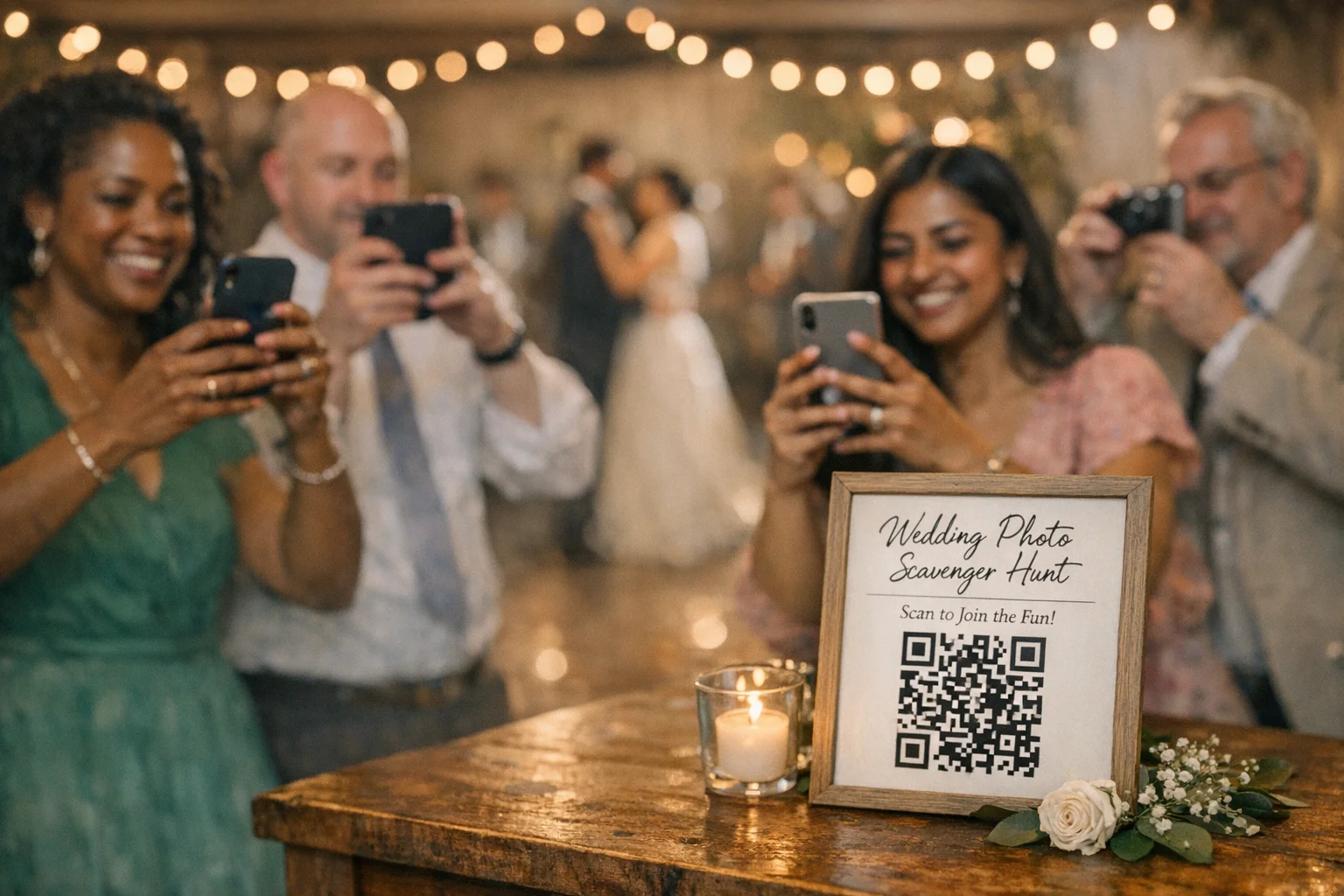
  • One place for info. Put a sign at the entrance with a QR code to rules, prompts, and upload.
  • One voice. Have the MC or DJ do two quick reminders, then a 2‑minute “winners” moment.
  • House rules. No blocking aisles, no flash near the pro photographer, and consent for close-ups.

If you’re planning an unplugged ceremony but still want guest photos later, that pairing works well. Many couples choose to keep the ceremony device-free and then open things up at the reception, a balance that The Knot’s unplugged wedding guide explains. (theknot.com)

Paper vs app: what to use and when

Both can work. Pick for simplicity on your day.

  • Printed cards shine for very small, seated receptions, or venues with weak signal. They feel tangible and low-tech. You’ll need a plan to collect photos later.
  • App or browser-based hunts scale better, automate scoring, and gather photos in one place in real time. They also make it easy to mix challenge types (photo, video, GPS, QR, Q&A) and show a live leaderboard.

If you go app-based, Scavify is built for this style of play. It supports challenge variety, automation (auto-approve easy prompts, review flagged ones later), ease of launch with templates, and browser + app flexibility for guests who don’t want to download another app. Keep it light, let the game run itself, and focus on the hugs.

Accessibility and inclusivity, made practical

A wedding is a temporary event with mixed ages and abilities. A few early choices make the hunt welcoming without diluting the fun.

  • Route and reach. Keep must-complete prompts within short, flat routes. Offer seated alternatives for any “roaming” task.
  • Language. Use simple verbs and add icons for kids or multilingual guests.
  • Sensory load. Avoid strobe-like prompts. Offer non-photo tasks for guests who prefer not to be on camera.

For deeper checklists, the ADA National Network’s guide to accessible temporary events is the gold-standard planning reference. It includes practical guidance on site layout, communication access, and restrooms. See the ADA National Network’s Planning Guide for Temporary Events. (adata.org) For a city-level example checklist with clear, current prompts, see the City of Philadelphia’s 2026 Accessible Event Checklist. (phila.gov)

Collecting the photos without chaos

Pick one upload path and make it obvious.

  • QR to shared album. A single QR code to your chosen album or app with short instructions. Place near the entrance and on table tents.
  • Hashtag, sparingly. Fun, but retrieval is messy and private accounts hide photos.
  • MC reminder. One nudge halfway through often doubles uploads.

If you’re weighing “unplugged vs plugged,” photographers have written thoughtfully about tradeoffs. A balanced approach is ceremony unplugged, reception open, with clear sightlines for the pro. For context, see a photographer-oriented take in Rangefinder’s overview of unplugged weddings, then make a call that fits your venue and guest mix. (rangefinderonline.com)

Keeping score, prizes, and wrap-up

  • Scoring. Simple totals are fine. If you want a finale, award bonus points for creativity or a prompt that ties to your story.
  • Prizes. Keep it light: dessert upgrade at the table, a photo op with you two, or a small local treat.
  • Closure. End with a two-minute “best-of” slideshow or a quick shout-out to top tables. It signals that the game is complete so guests can move fully into dancing.

Common mistakes to skip

  • Over-programming. Your reception is not a field day. Fewer, better prompts keep energy up.
  • Blocking the pros. Design prompts that don’t pull guests into aisles or altar sightlines.
  • One-size-for-all lists. Calibrate for elders, kids, and guests using mobility aids.
  • Too many upload methods. One path, everywhere.

Ready-to-use assets

Use or adapt these. Short, specific, and human is the goal.

Sign text (for entry or welcome table): “Help us spot the moments we’ll miss. Open your camera, scan the QR, and complete any 10 prompts before the first dance. Please be respectful of our photographer and keep aisles clear. Thanks for playing with us.”

MC script (30 seconds): “Friends, your mission is live. Scan the QR on your table card. You’ve got until the first dance to complete as many prompts as you like. Two quick rules: ask before close-ups and keep pathways clear. Top table gets bragging rights and a sweet surprise.”

Table card micro-instructions: “Open camera. Scan. Tap ‘Join.’ Post as you go. That’s it.”

Example themed mini-lists

Tune the tone to match your people.

Rom-com cues - [Photo | 20 pts]: A meet-cute happening in real time - [Photo | 30 pts]: A dramatic dip you swear was accidental - [Video | 50 pts]: Guests reenact a favorite movie proposal

Family-forward - [Photo | 20 pts]: Three generations in one frame - [Q&A | 30 pts]: Eldest guest’s best marriage advice (one sentence) - [Photo | 40 pts]: The moment that will make tomorrow’s group chat

Venue love letter - [Photo | 20 pts]: Architectural detail that deserves a close-up - [Photo | 30 pts]: Light through glass, window, or water - [Video | 40 pts]: A 10-second “tour” of your favorite spot

FAQs

How many prompts should we include?

20 to 30 total works for most receptions. Include 10 easy, 8 medium, and 2 long shots so every guest can score quick wins without leaving their table for long.

When should we run the hunt?

Cocktail hour through the first dance is a reliable window. It captures downtime, avoids dinner service conflicts, and gives you a natural wrap-up moment for prizes or a mini-slideshow.

Is a wedding scavenger hunt disruptive for our photographer?

It doesn’t have to be. Add two house rules in print and in the MC script: keep aisles clear and ask before close-ups. Pair it with an unplugged ceremony if you want clean pro shots early, a common approach discussed in resources like The Knot’s unplugged guide. (theknot.com)

Should we use a hashtag or a shared album?

Hashtags are fun but incomplete. A QR to a shared album or an app centralizes uploads and avoids private-account black holes. It also simplifies downloading later for a recap post or slideshow.

What about guests who don’t want to be photographed?

Include consent in the rules: no close-ups without permission. Offer non-photo prompts (Q&A, QR finds, table-based tasks) so everyone can participate comfortably.

How do we make it accessible?

Keep must-complete tasks near seating, provide seated alternatives, and avoid strobe-like prompts. For comprehensive event accessibility guidance, see the ADA National Network’s temporary events planning guide. (adata.org)

Any etiquette concerns with guest photos?

Set expectations up front. If you’re unplugged for the ceremony and open for the reception, say so on signage and in your MC script. Photographer and industry discussions, like Rangefinder’s unplugged overview, outline tradeoffs so you can pick what fits your day. (rangefinderonline.com)

Can we run this without downloading an app?

Yes. If you use Scavify, guests can join from a mobile browser or the app. That flexibility helps multi-generational crowds participate without tech friction.
Building a Scavenger Hunt?

Scavify is the world's most interactive and trusted scavenger hunt app. Contact us today for a demo, free trial, and pricing.

YOU MAY ALSO LIKE

Periodic Table Scavenger Hunt Ideas for Any Grade